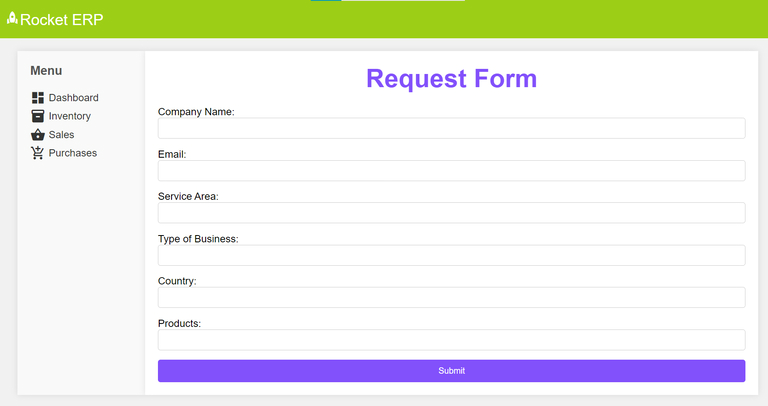
--- title: "Starting a Request via Web Hook" slug: "starting-a-request-via-web-hook" updated: 2025-10-21T03:00:22Z published: 2025-10-21T03:00:22Z canonical: "docs.processmaker.com/starting-a-request-via-web-hook" --- > ## Documentation Index > Fetch the complete documentation index at: https://docs.processmaker.com/llms.txt > Use this file to discover all available pages before exploring further. # Starting a Request via Web Hook In this guide, you will learn how to integrate the ProcessMaker app into third-party applications using web hooks to **initiate new process requests**. This integration allows you to seamlessly kick off workflow processes within the ProcessMaker environment from your own application. By the end of this guide, you will have accomplished the following:  ### Prerequisites | Requirement | Function | Version | | --- | --- | --- | | ProcessMaker Platform | Access to the ProcessMaker app with administrative privileges | 4.6+ | | Code Editor | Choose a code editor of your choice that suits your preferences. Popular code editors for development include Visual Studio Code, Sublime Text, and Atom | Your choice | ## Steps to Integrate ProcessMaker using Web Hooks By following the steps below, seamlessly integrate your ProcessMaker's workflow/process into your application to initiate new requests. ### Step 1: Configure Web Hook in ProcessMaker To seamlessly integrate ProcessMaker workflow/processes using web hooks begin by generating the web hook. Follow this example to generate the [ProcessMaker web hook.](https://docs.processmaker.com/docs/example-signal-design-with-webhooks) #### Web Hook Link ```plaintext https://my-server.processmaker.net/webhook/0a089078587bdcdef5f7a2c2f0fd7a3c ``` #### JSON Format Example Based on the screen/form variables that you've defined within the ProcessMaker platform for your process, ensure to adjust the below example with your defined ProcessMaker form variables. Example that shows the JSON data you need to send to the webhook: ```json { "companyName":"InsuCare", "email":"john.doe@insucare.com", "serviceArea":"123 Boeing Avenue", "typeBusiness":"Insurance", "country":"United States", "products":"Laptop" } ``` #### Postman Example Below is an illustrative example demonstrating the utilization of the web hook through Postman to trigger the API and initiate a request.  ### Step 2: Integrate the Web Hook into Your Application Now, that you have the web hook link, identify the appropriate location within your application to integrate the ProcessMaker workflow/process form. This could be a specific page, a modal window, or any other suitable area. Below is a straightforward illustration showcasing how the integration can be implemented within a web application. Feel free to utilize the provided sample HTML code as a starting point: **HTML** ```xml