Use the Documentation package to enter and view documentation for your Processes. Entered documentation is for informational purposes only and does not affect Request workflow.
The documentation displays as a page within ProcessMaker Platform. Use the Web browser to print or save as a PDF if your browser supports those functions.
Process documentation has the following attributes:
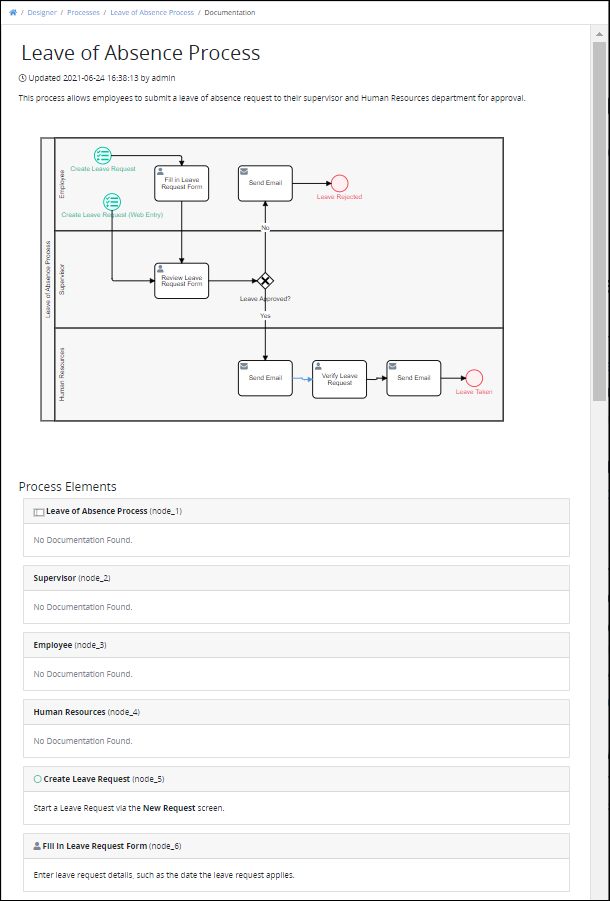
The page generated by the Documentation package provides the following information about the Process:
The name of the Process.
When was the Process was last updated and by whom.
A description of the Process as entered when creating a new process.
An image of the Process map.
Names of all Process elements and their unique node IDs.
The documented description of each Process element and/or connector. If no description has been entered for an element/connector, No Documentation Found message displays.
Below is a documented Process.
See the following topics regarding how to view Process documentation and edit the description for Process elements and/or connectors:
View Documentation for a process: View documentation for a process from the Processes tab.
Start Event element configuration: Configure how to edit the description for a Start Event element.
Start Timer Event element configuration: Configure how to edit the description for a Start Timer Event element.
Signal Start Event element configuration: Configure how to edit the description for a Signal Start Event element.
Message Start Event element configuration: Configure how to edit the description for a Message Start Event element.
Conditional Start Event element configuration: Configure how to edit the description for a Conditional Start Event element.
Intermediate Timer Event element configuration: Configure how to edit the description for an Intermediate Timer Event element.
Intermediate Signal Catch Event element configuration: Configure how to edit the description for an Intermediate Signal Catch Event element.
Intermediate Signal Throw Event element configuration: Configure how to edit the description for an Intermediate Message Throw Event element.
Intermediate Message Catch Event element configuration: Configure how to edit the description for an Intermediate Message Catch Event element.
Intermediate Message Throw Event element configuration: Configure how to edit the description for an Intermediate Message Throw Event element.
Intermediate Conditional Catch Event element configuration: Configure how to edit the description for an Intermediate Conditional Catch event element.
End Event element configuration: Configure how to edit the description for an End Event element.
Message End Event element configuration: Configure how to edit the description for a Message End Event element.
Error End Event element configuration: Configure how to edit the description for an Error End Event element.
Signal End Event element configuration: Configure how to edit the description for a Signal End Event element.
Terminate End Event element configuration: Configure how to edit the description for a Terminate End Event element.
Form Task element configuration: Configure how to edit the description for a Form Task element.
Manual Task element configuration: Configure how to edit the description for a Manual Task element.
Script Task element configuration: Configure how to edit the description for a Script Task element.
Sub Process element configuration: Configure how to edit the description for a Sub process element.
Boundary Timer Event element configuration: Configure how to edit the description for a Boundary Timer Event element.
Boundary Error Event element configuration: Configure how to edit the description for a Boundary Error Event element.
Boundary Signal Event element configuration: Configure how to edit the description for a Boundary Signal Event element.
Boundary Conditional Event element configuration: Configure how to edit the description for a Boundary Conditional Event element.
Boundary Message Event element configuration: Configure how to edit the description for a Boundary Message Event element.
Exclusive Gateway element configuration: Configure how to edit the description for an Exclusive Gateway element.
Inclusive Gateway element configuration: Configure how to edit the description for an Inclusive Gateway element.
Parallel Gateway element configuration: Configure how to edit the description for a parallel Gateway element.
Event-Based Gateway element configuration: Configure how to edit the description for an Event-Based Gateway element.
Pool element configuration: Configure how to edit the description for a Pool element.
Lane element configuration: Configure how to edit the description for a Lane element.
Text Annotation element configuration: Configure how to edit the description for a Text Annotation element.
Message Flow element configuration: Configure how to edit the description for a Message Flow element.
Actions by Email connector configuration: Configure how to edit the description for an Actions by Email connector.
Data Connector connector configuration: Configure how to edit the description for a Data Connector connector.
DocuSign connector configuration: Configure how to edit the description for a DocuSign connector.
PDF Generator connector configuration: Configure how to edit the description for a PDF Generator connector.
Send Email connector configuration: Configure how to edit the description for a Send Email connector.
Slack Notification connector configuration: Configure how to edit the description for a Slack Notification connector.